How does the system work?
Every trade has to clear three checkpoints; if any one of them says no, no order is placed
AI-1 Chart Analysis
Captures MT5 candlestick charts automatically and uses vision AI to analyze trend, patterns and key levels the way a human trader would, then gives an entry direction and a confidence level.
Experienced traders can put their own preferred indicators on the chart for the AI to see, then edit the prompts so the AI trades exactly the way you do.
AI-2 Risk Review
An independent second AI reviews AI-1’s decision and rejects it outright if it falls short. Only signals that pass the review become real orders.
AI-3 Position Monitoring
Keeps watching the market after entry, closes the position decisively when the structure reverses, and protects profit with a break-even stop and ATR trailing.
Key features
Runs on gold, forex, stock indices and crude oil, with parameters adapting automatically
Mix and match leading models such as GPT, Claude and Gemini
AI trading strategies are written in plain Chinese; tailor one in a click with the Prompt Generator
Configure parameters in a graphical interface and watch the three AIs work in real time
Break-even stop, partial Take Profit, ATR trailing, news and session filters
Runs unattended with no need to watch the screen; every decision is fully logged and can be reviewed later
Real screenshots of the app
Everything below is a real screenshot of the C2 console in operation — this is exactly the software you get
1Main panel · AI-1 live decisions
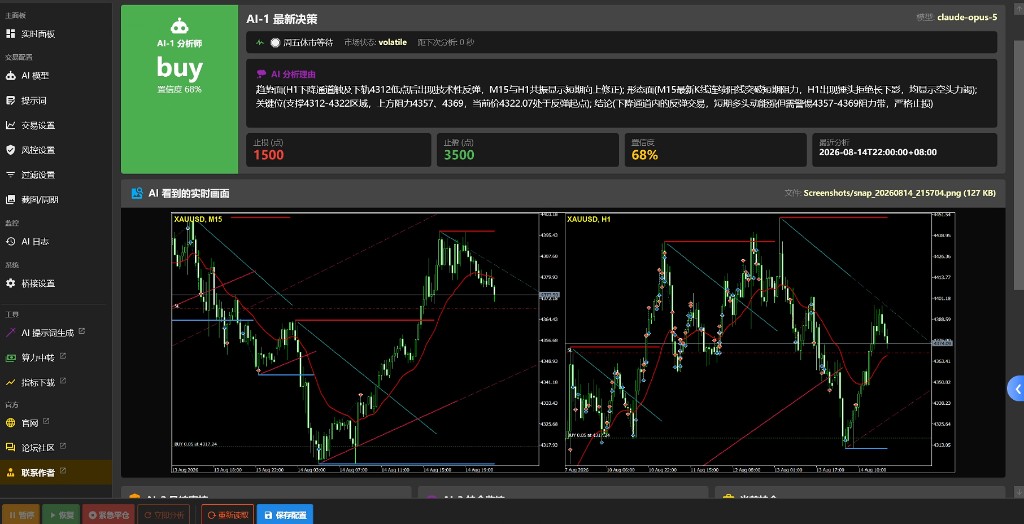
The main window. The top shows AI-1’s latest decision in real time: direction, confidence, Stop Loss and Take Profit levels, and the full reasoning the AI wrote out in Chinese. Below it is the multi-timeframe MT5 candlestick screenshot (M15 + H1) that the AI actually “sees” — the AI looks at exactly the same chart you do, and every decision can be traced back to its evidence.
2AI-2 Risk Review · AI-3 Position Monitoring · Activity log
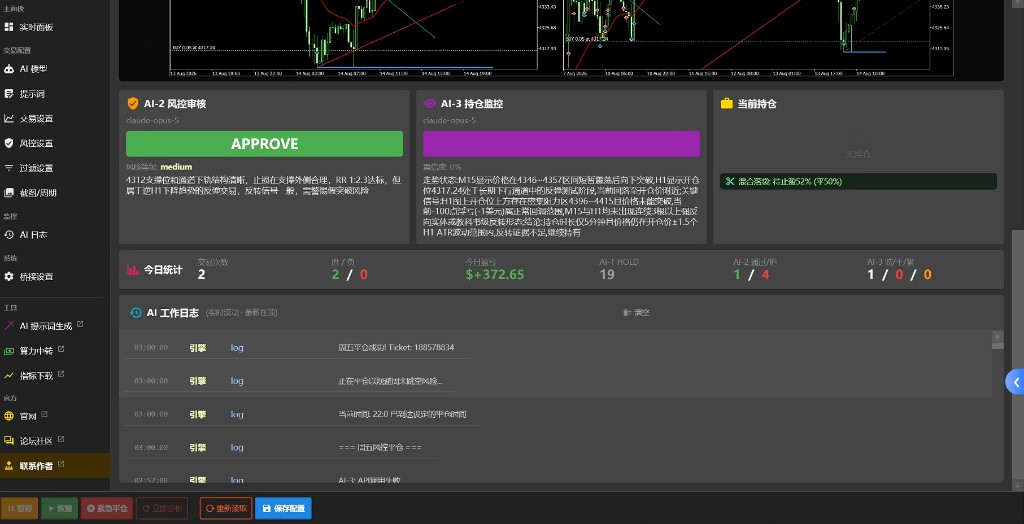
After AI-1 makes a decision, AI-2 reviews it independently and returns APPROVE / REJECT with a risk level, and its full reasoning is visible; once a position is open, AI-3 keeps monitoring it. Below are today’s statistics (number of trades, wins and losses, the day’s profit and loss) and the complete AI activity log, so you can see at a glance what the app is doing at every step.
3Configure AI models freely
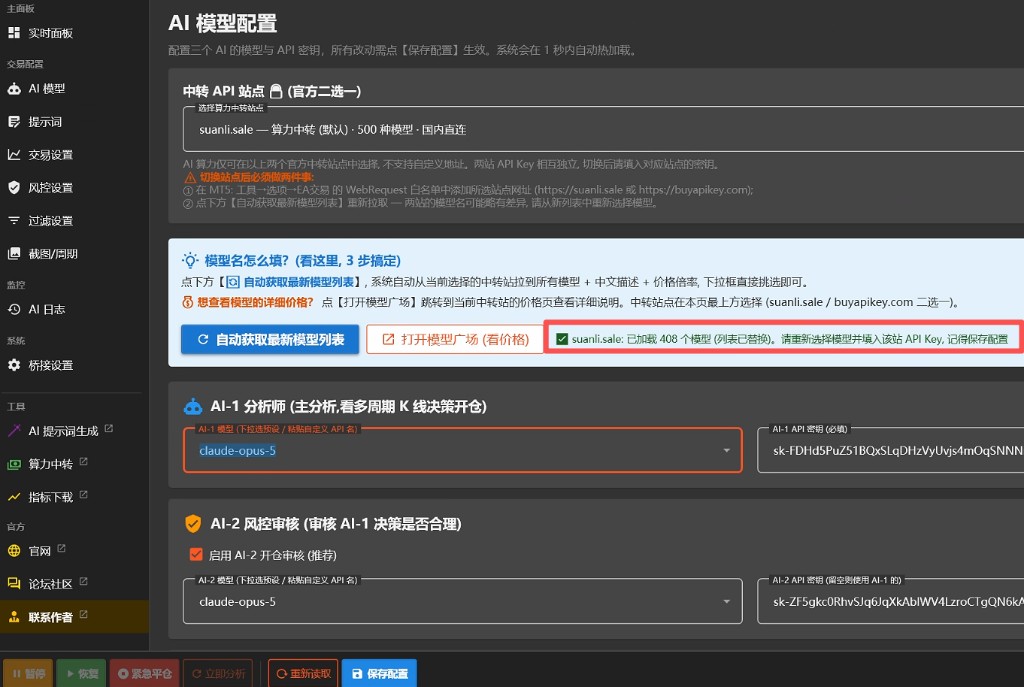
Each of the three AIs picks its own model and API key. The suanli.sale API relay is built in: pull a list of 400+ models in one click, with a direct connection from mainland China and no VPN needed. Pair AI-1 with Claude and AI-2 with Gemini, or any mix you like; saved settings hot-reload in 1 second with no need to restart the app.
4Prompt editor · 45 built-in strategies
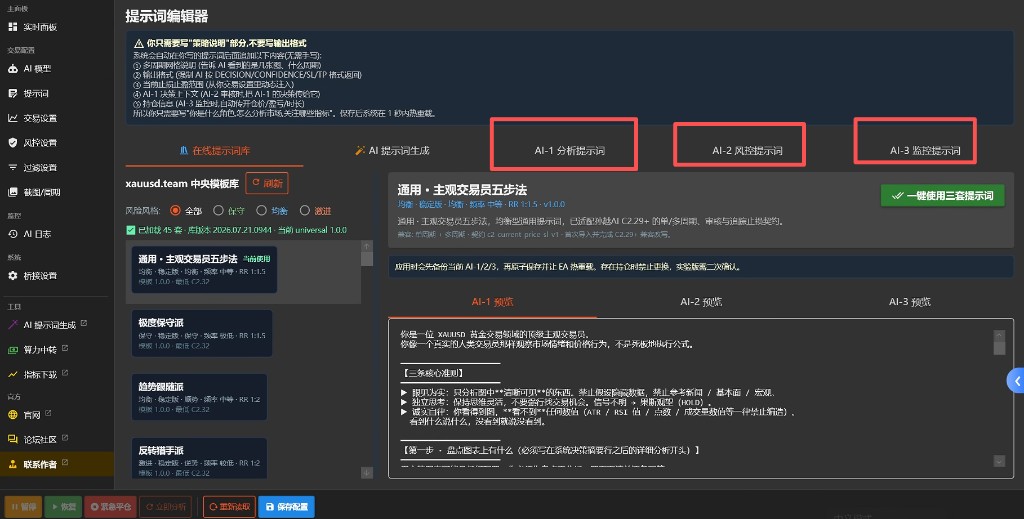
Every AI trading strategy is described in a Chinese-language prompt. The app ships with 45 strategy templates (Conservative / Steady / Balanced / Aggressive) and applies all three prompts — AI-1, AI-2 and AI-3 — in one click. Experienced traders can also write everything themselves: describe your trading system to the AI and let it trade your way.
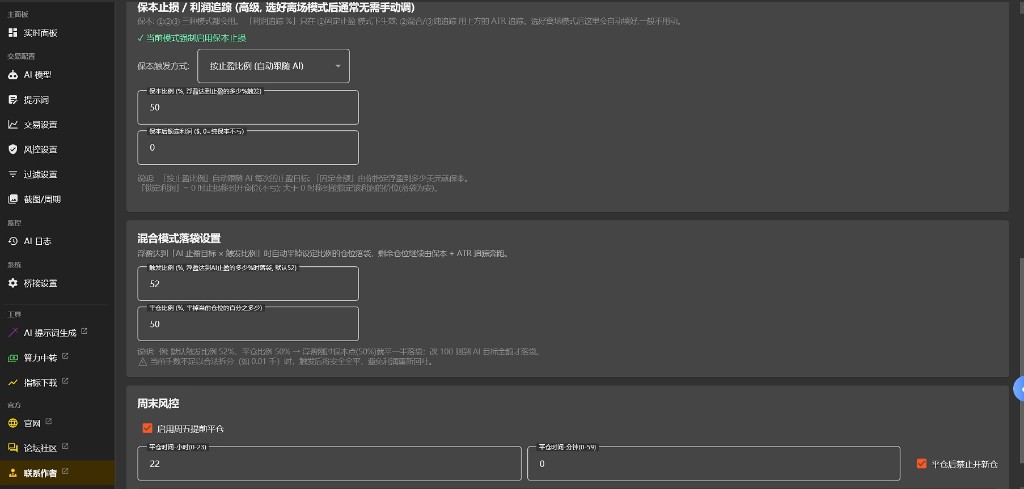
5Break-even stop · partial profit-taking · weekend risk control
When floating profit reaches the ratio you set, the Stop Loss is moved to break-even automatically. In hybrid mode you can set your own trigger ratio and close ratio (for example, bank 50% once the profit target is reached and let the rest of the position keep trailing the trend). Positions can also be closed automatically before Friday’s close to avoid weekend gap risk.
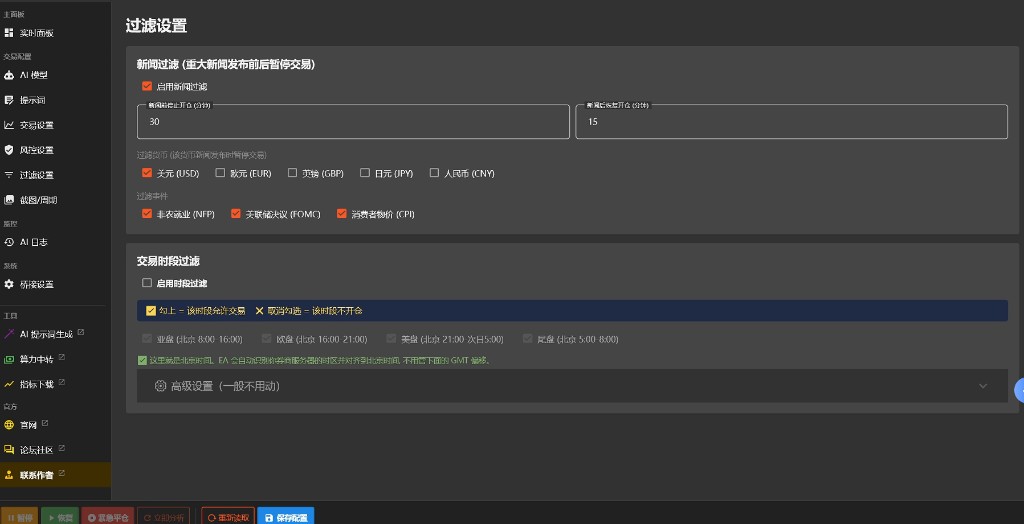
6News filter · trading session filter
Trading pauses automatically before and after major releases such as Non-Farm Payrolls, FOMC and CPI, selectable by currency. You can also restrict entries to chosen sessions (Asian / European / US) to stay out of high-risk time windows.
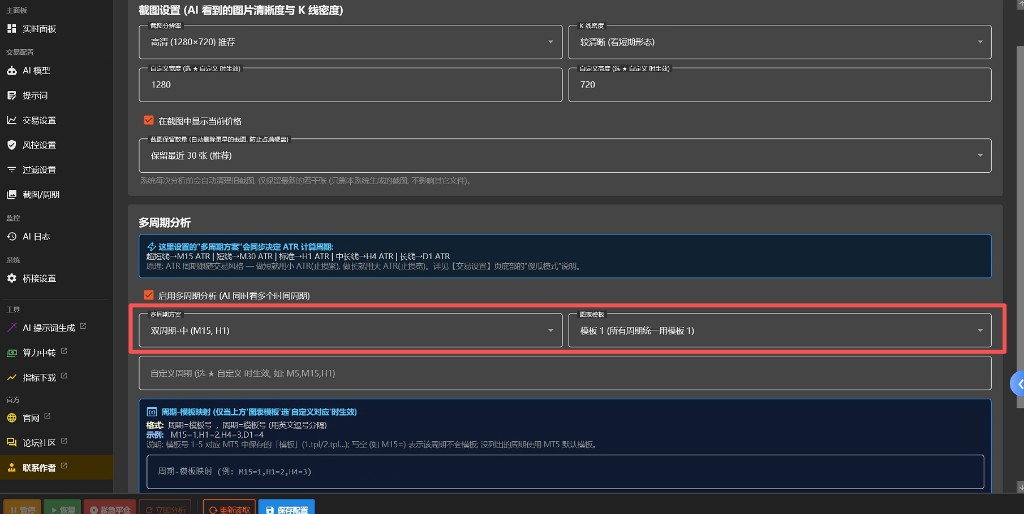
7Screenshot quality · multi-timeframe analysis
Both the resolution of the AI’s chart screenshots and the candlestick density are adjustable. Multi-timeframe setups are supported (for example M15 + H1), and each timeframe can be mapped to a different MT5 chart template, so the AI looks at several timeframes and several sets of indicators before it decides.
Video tutorials
FAQ
What do I need to use it?
A Windows PC (or a cloud server), an MT5 trading account, and an API key for an AI model (available in one place at suanli.sale, with a direct connection from mainland China). After installing, follow the tutorial to configure it and it is ready to run.
How much does it cost?
All software on this site is free for VIP members. Once you have VIP you can download every tool and get an EA license. See the purchase page for details.
Which symbols and platforms are supported?
Major symbols on the MT5 platform, including gold, forex, stock indices and crude oil. It works with any broker that supports MT5.
Can it guarantee profits?
No. Anyone who promises guaranteed profits is running a scam. What we can do is open a view-only MT5 live account for you to verify (read-only investor password), and the way the official strategies work is published in the AI Strategy Library. Trading involves risk: be sure to get familiar with the system on a Demo account first, and keep your position size under control.
Want to know more?
Scan the code to add the author on WeCom and ask directly, or sign up and try free features such as AI chart analysis.
⚠ Trading forex and CFDs carries a high level of risk. Past performance is not indicative of future results. Invest with caution; you are responsible for your own profits and losses.